EROAD Product Updates – Q1/Q2 2026 | New Features & Launches
EROAD Product Updates – Q1/Q2 2026 | New Features & Launches
EROAD Product Round-Up, Q1/Q2 2026
The latest launches, feature updates and platform improvements across AI, dashcams, fleet safety and compliance.
What's New
Between February and July 2026, we launched a new hardware product, rolled out AI detector improvements, and shipped a series of platform updates to reduce admin time and improve usability.
Clarity Edge Multicam: 360° Visibility Around Your Vehicles
Standard dashcams show what's happening in front of your vehicle. But blind spots, reversing incidents, yard damage and disputed claims often go unrecorded, making investigations slow and costly. Clarity Edge Multicam expands EROAD's AI-powered dashcam into a fully modular, multi-camera fleet protection system, giving operators up to six camera angles in and around each vehicle, all managed within the same platform alongside telematics, compliance and safety data.
Key capabilities:
- Up to six camera angles: a modular system built around EROAD's existing AI dashcam and fatigue camera, with options for side, rear and cargo cameras
- Automatic camera linking: when an event is detected, footage from all connected cameras is automatically linked, giving a complete picture without manual searching or toggling between screens
- In-cab display: an optional screen provides drivers with a live view from external cameras, supporting safer lane changes, reversing and manoeuvring in tight spaces
Video and telematics data are reviewed directly in the Replay portal, giving fleet managers remote access to relevant footage and a consistent, objective basis for driver coaching and incident investigation.
Learn more about Clarity Edge MulticamDashcam AI Detector Updates: Smarter, More Accurate Driver Alerts
As part of our ongoing AI optimisation programme, we've updated the sensitivity, thresholds and stand down times across several Clarity Edge detectors. These changes were informed by real-world performance data and direct customer feedback, with the goal of reducing false positives and improving the reliability of alerts for both drivers and fleet managers. Updates were delivered automatically to all Clarity Edge devices.
Additionally, TLS encryption is now enabled across all Clarity Edge device connections, ensuring footage and data are transmitted more securely.
Learn about our AI-powered dashcam solutionMonitor Dashcam Faults Across Your Fleet
Your dashcam health and management page (Admin > Dashcams) now includes a dedicated current device faults field, giving you visibility of any faults being reported by your Clarity Edge devices, alongside existing information such as connection status, install status, plan type and last event snapshot.
This update was driven directly by customer feedback. For fleets with a high commitment to safety, knowing every device is functioning as expected is essential, not optional. Any issues can now be identified and resolved quickly, minimising gaps in your safety coverage and giving you confidence that your devices are recording when it matters most.
Replay Portal: Cleaner Interface and Smarter False Positive Management
We've made improvements to the Replay portal to deliver a cleaner interface and a more capable workflow for managing AI-generated false positive events.
Interface updates:
- Simplified header area: streamlined to show only the most relevant status
- Reorganised event details panel: surfaces the most important information at a glance
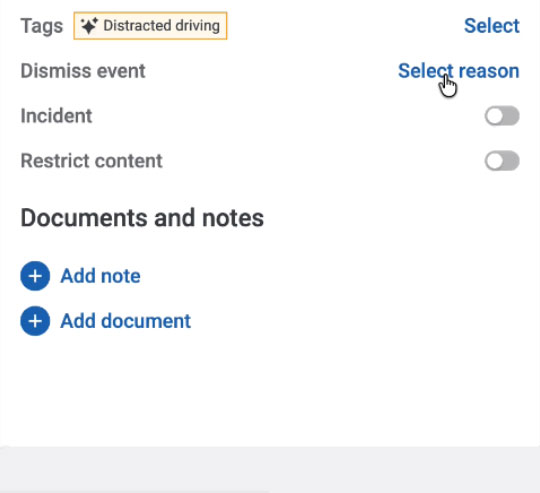
- Easy access to the Dismiss Event feature: within the event detail panel
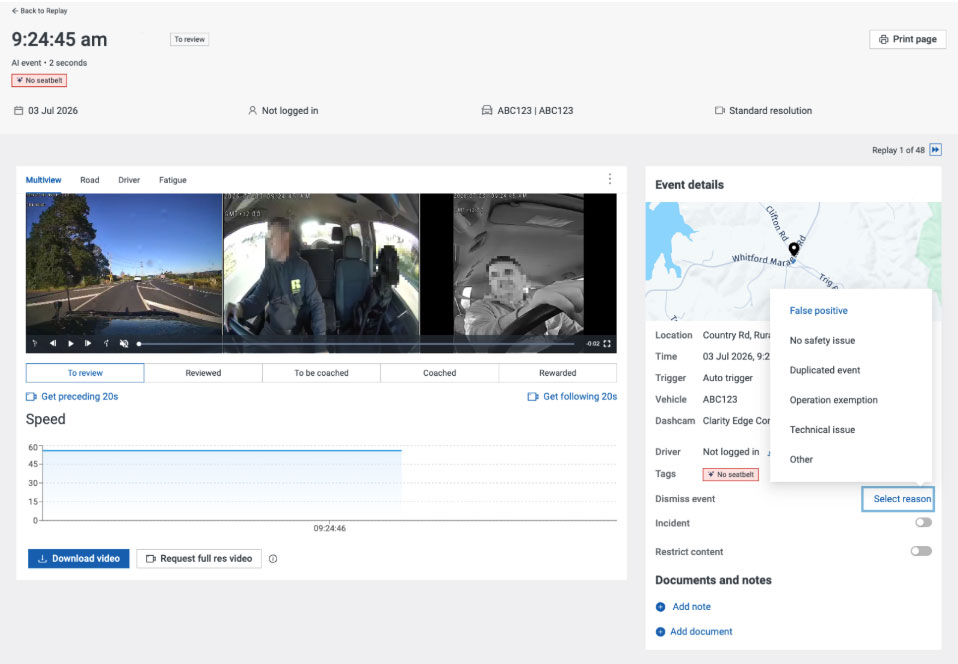
Dismiss false positive events:
We've replaced the previous thumbs up/thumbs down feedback feature with a more capable Dismiss Event workflow, reducing the number of actions needed and keeping your Replay view clean and focused.
How it works:
- Select the event you want to dismiss
- Choose a reason from the dropdown
- The clip is automatically marked as reviewed and dismissed, and hidden from your main Replay list by default
To review dismissed events at any time, use the Dismissed Events filter.
Additional capabilities:
- Bulk dismiss: select similar events and dismiss them all at once; useful for scenarios such as a driver not wearing a seatbelt on a private farm road (where it is permitted)
- Restore dismissed events: if an event is dismissed in error, it can be easily restored
Beyond keeping Replay cleaner and reducing admin overhead, this workflow also feeds richer, more structured feedback directly into EROAD's AI models, helping our detectors learn and improve continuously over time.
Stay Up to Date
We publish product round-ups regularly to keep you informed of the latest developments across EROAD's fleet management solutions.
Have feedback on any of these updates, or want to know more? Talk to your EROAD account manager or get in touch with our support team.